Release summary
These facts are based on the implemented 1.0.5 application and release configuration, so you can confirm compatibility, languages, pricing, and product behaviour before downloading.
- Product
- Eastern Sage
东方智者 - Version
- 1.0.5
Build 1 - Release date
- August 28, 2026
First public release - System requirement
- mac OS 13
or later - Application
- Native Mac app
Menu bar and desktop companion - Languages
- English / 简体中文
Switch at runtime
Desktop companionship
Eastern Sage is designed as a calm presence that stays out of the way, not a desktop tool that constantly interrupts.
A quiet place on your desktop
The transparent, borderless companion appears near the lower-right corner by default and can remain visible across desktop Spaces and full-screen workspaces. Transparent areas around the character do not block mouse input.
Alive, without demanding attention
Subtle breathing, natural blinking, mouse-following gaze, and long-idle rest give the character presence without frequent prompts.
Fits your desktop habits
Drag the character and its position is remembered. You can also change its size, lock its position, restore the lower-right placement, and enable launch at login.
Expands only when invited
Hover for quick actions, single-click for the interaction card, double-click to talk, or right-click for size, position, language, membership, and quit controls.
Conversation and Eastern wisdom
| Feature | Implemented behaviour in 1.0.5 |
|---|---|
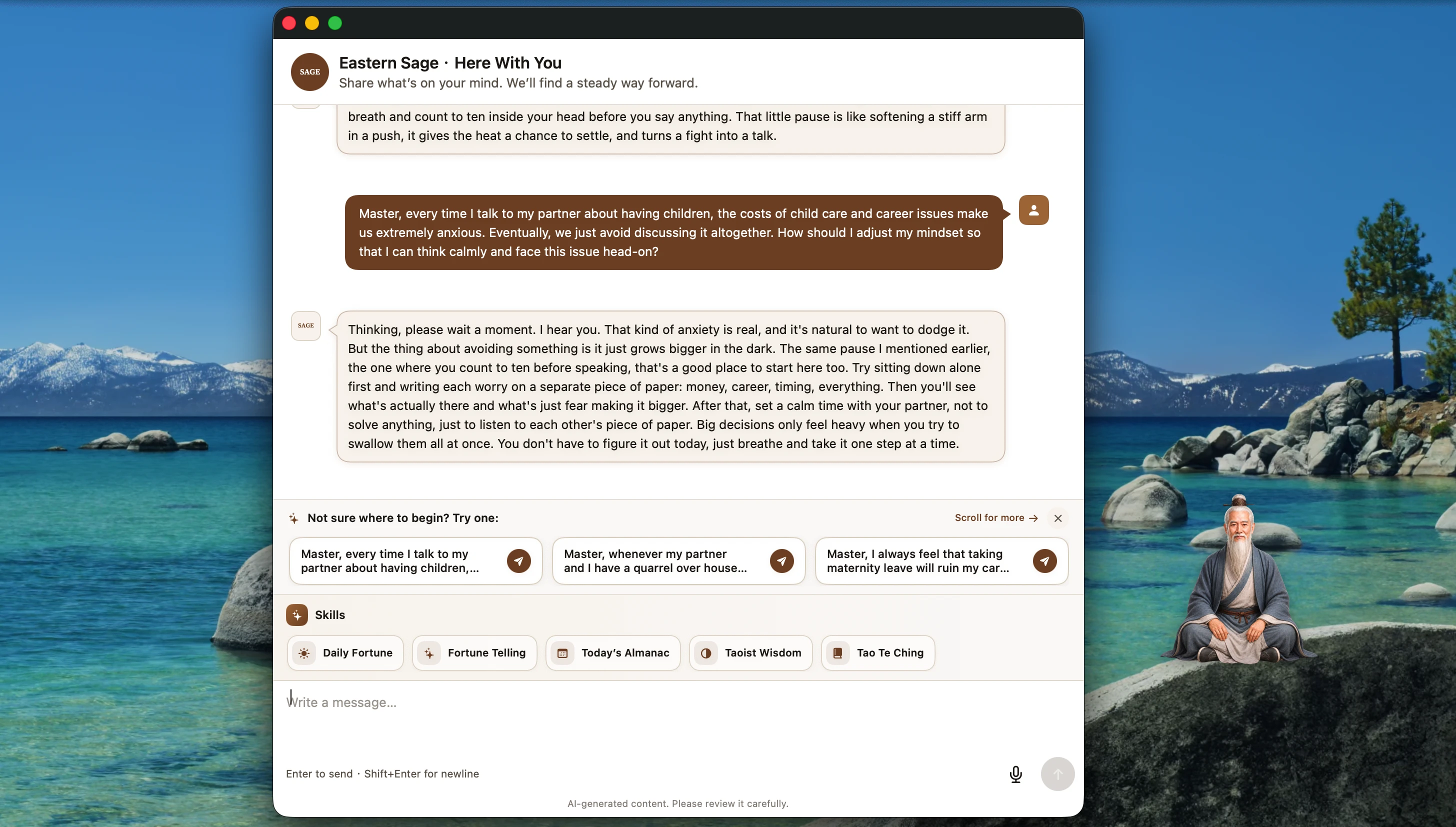
| Text conversation | Send text in a resizable native window and read streaming replies as they arrive. The window can move, enter mac OS full screen, and restore its previous state. |
| Voice conversation | Recording starts only after you choose voice input and grant microphone access. Audio is sent for recognition; recognised text can be shown, and response speech can be played when returned by the service. |
| Conversation history | After sign-in, recent history associated with the current Eastern Sage account is loaded, with pagination for earlier conversations. |
| Suggested prompts | The first ten conversation openings offer life-context prompts covering relationships, caregiving, returning to work, burnout, job loss, living costs, debt, and life transitions. |
| Reflection guidance | A guided path helps settle thoughts, bring kindness to the situation, seek balance, release what can be released, and identify one next step. |
| Eastern-wisdom shortcuts | Shortcuts cover Taoist thought, the Tao Te Ching, daily fortune, fortune reading, and the Chinese almanac. Some responses can include a generated visual card. |
Meditation, calming audio, and daily experiences
Themed guided meditation
Browse and search meditation themes, then request a spoken session with start, pause, resume, replay, and next-session controls.
Calming audio
A dedicated player provides audio for quiet focus and relaxation, with playback, pause, and content navigation.
Daily fortune and fortune reading
You choose focus areas and time range, then deliberately enter birth information for the request. Results are for cultural interest and personal reflection and do not guarantee outcomes.
Almanac and reminders
Ask for the day’s Chinese almanac in conversation and create separate fortune or almanac reminders, either once or on selected weekdays. Results appear beside the desktop companion.
Account, connectivity, and membership
| Item | Current rule |
|---|---|
| Sign-in | Sign in with email and a six-digit one-time code. You can explore the interface first; sending conversations, loading account-linked history, and membership services require authentication. |
| Internet connection | The companion’s basic presence and local preferences stay on the Mac. AI conversation, voice processing, online audio, fortune, almanac, account, and membership services require a connection. |
| Free trial | New users can try the currently available features free for seven days. |
| One-year access | The standard price is US$19.90/year. A purchase adds one year of access and does not automatically renew or charge again at expiry. |
| Purchase and redemption | The app can read membership status, open browser checkout, show purchase history, and accept a six-digit redemption code. The checkout page is the authority for the final transaction price. |
| Founding 100 | The first 100 users to complete all eligibility steps can receive lifetime access to the Eastern Sage app and digital service, subject to the program rules. |
Privacy and product boundary
Relevant information is processed only when you choose the feature.
The text you submit, voice you actively record, and birth information you deliberately enter for fortune experiences are sent to the service to provide those features. Eastern Sage is a companionship, reflection, and cultural-interest product—not medical care, psychotherapy, crisis response, legal advice, or financial advice.
Release history
Because 1.0.5 is the first public release, there is currently one entry. Future releases will be added here by date without rewriting earlier records.
| Version | Release date | What shipped |
|---|---|---|
| 1.0.5 (Build 1)Current | 2026-08-28 | First public release of Eastern Sage, including the native mac OS desktop companion, text and voice conversation, conversation history, guided meditation, calming audio, daily fortune, fortune reading, almanac reminders, membership management, and in-app updates. |